
Most analytics start with a script tag. It loads in the visitor's browser, sets a cookie and reports back what happened on the page. That's how you get scroll depth and button clicks. It's also how you get a cookie banner, a slower page and numbers that quietly leave out everyone with an ad blocker.
There's another source of truth that's been there all along: the requests themselves. Your server, or whatever sits in front of it, sees every page load. Here's what that's worth. Also what it isn't.
What a request already tells you
A browser loading a page sends a surprising amount of context without anyone asking:
GET /pricing HTTP/1.1
Host: shop.example.com
Referer: https://www.google.com/
User-Agent: Mozilla/5.0 (iPhone; CPU iPhone OS 18_1 like Mac OS X) ...
Sec-Fetch-Dest: document
That's the page (/pricing), where the visitor came from (Google), the device and browser (an iPhone, Safari) and, from Sec-Fetch-Dest: document, the fact that this is a real page load rather than an image or a background API call. The connection itself carries an IP address, which maps to a country.
No script ran. Ad blockers don't touch it, because blocking it would mean not loading the page.
Turning requests into numbers
Raw requests aren't analytics yet. A single page view brings along dozens of requests for scripts, styles and images. A good share of all traffic is bots. This is roughly how DomainDock counts at its gateway:
- Page views are requests for a document that worked:
Sec-Fetch-Dest: document(orAccept: text/htmlfrom older browsers), a GET, a 2xx or 3xx answer. Prefetches are skipped. - Visits are page views that arrived from outside the site: no referrer, or a referrer on another domain. Clicking from your home page to your pricing page is the same visit.
- Sources come from the referrer, grouped by name for the big ones (Google, Reddit, Instagram). A
?utm_source=newsletteron the link wins over the referrer, so campaigns you tag show up under the name you gave them. - Bots are recognised by their user agent and kept out of the visitor numbers. Crawlers, uptime monitors and
curlare counted separately.
Unique visitors without knowing who anyone is
The hard part is "unique". Without a cookie, how do you know two page views came from the same person?
The method DomainDock uses is the one Plausible documents publicly: combine the IP address, the user agent and the site with a random secret, then hash it. The same person on the same day produces the same hash, so they're counted once. The secret is replaced every day and never stored with the counts, so yesterday's hash can't be linked to today's, the hash can't be turned back into an IP. Nobody can be followed across days or sites. The IP and user agent are only used in memory for that moment and then thrown away.
What's stored is counts: page views per page, visits per source and country, per device type. You don't need a cookie banner for that, because nothing is stored on the visitor's device and nothing identifies them.
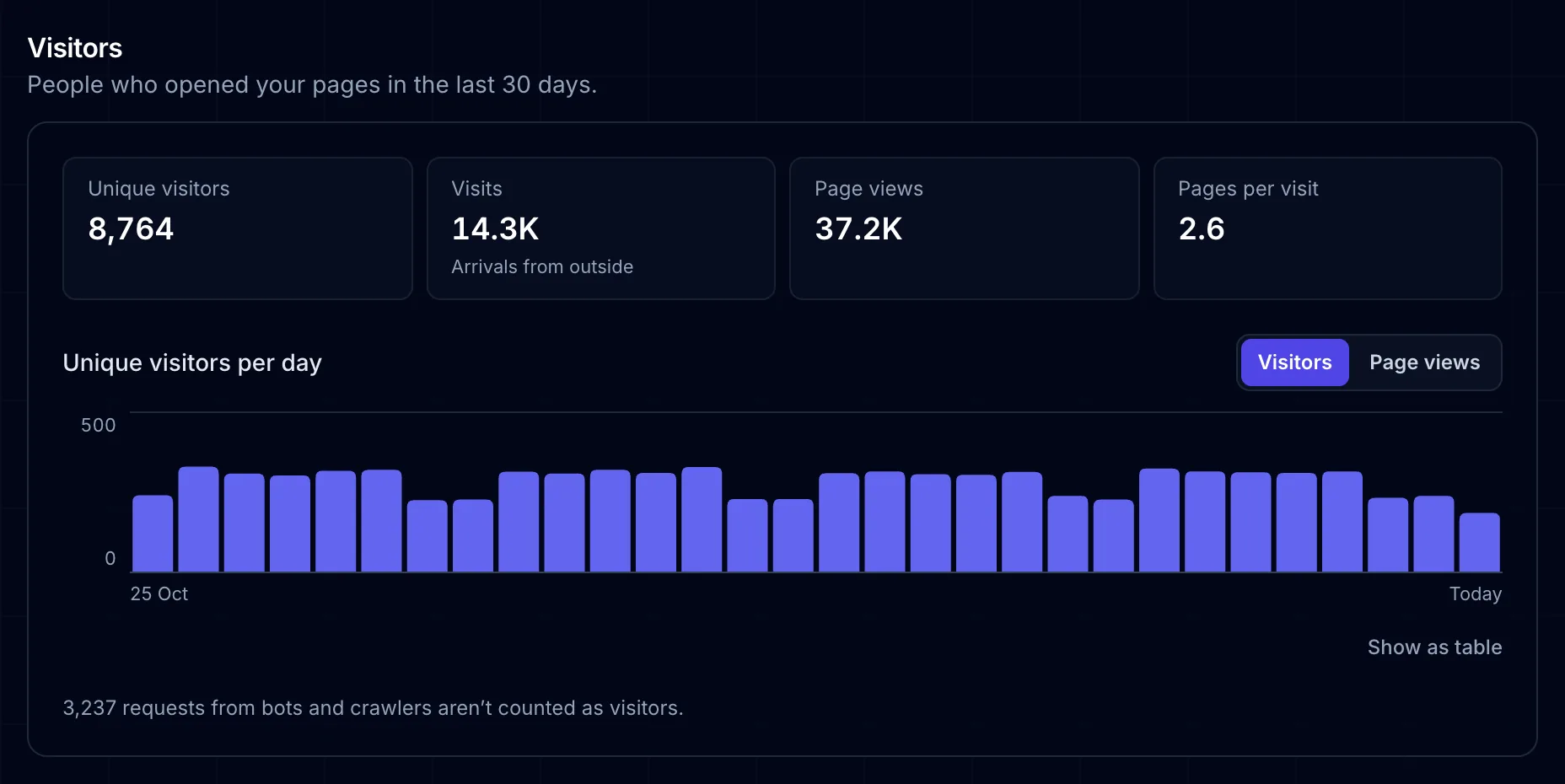 Visitors, visits and page views for a demo shop over 30 days.
What you can see
Beyond the totals, server-side numbers answer the questions most small sites actually have:
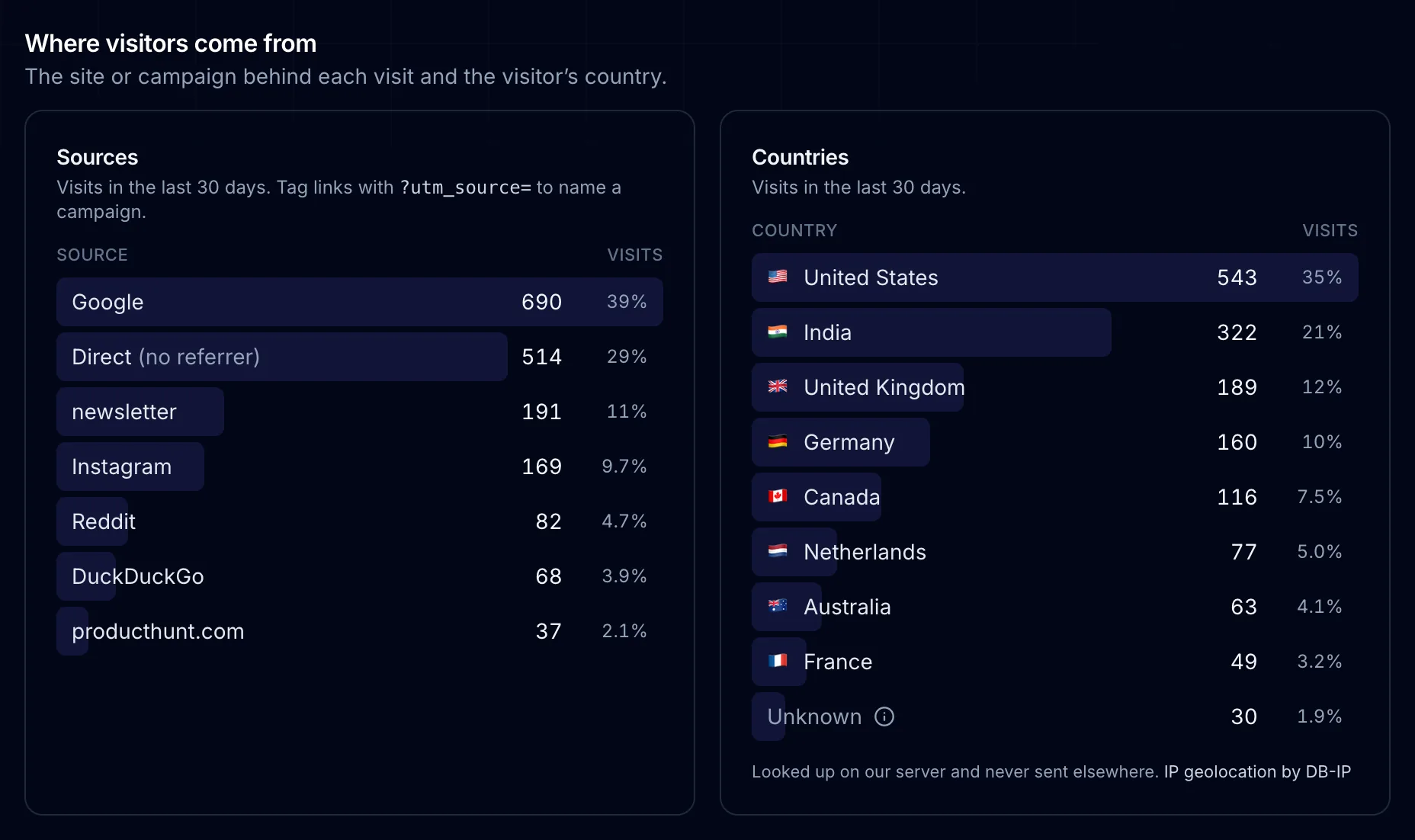 Where visits come from: sites, a tagged newsletter and countries.
Countries are looked up on DomainDock's own servers from a local database (DB-IP's free country data), so visitors' addresses aren't sent to a third-party lookup service.
The pages list has a second tab that's easy to overlook and very useful: Not found. It lists the missing pages people asked for, which is how you find the old URL a newsletter still links to, or the product page you renamed last month.
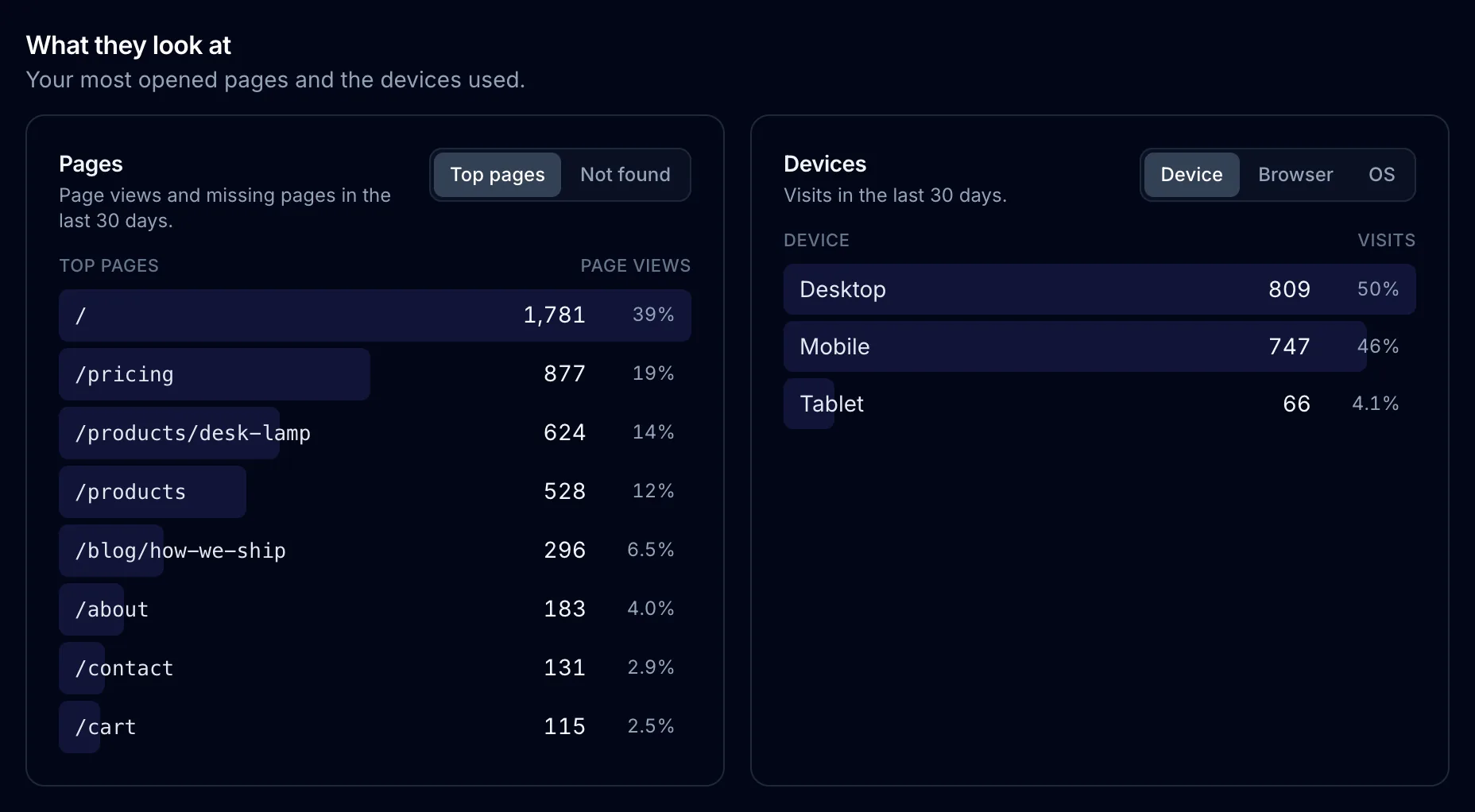 Top pages, missing pages and the devices people use.
What you give up
Nothing runs in the browser, so anything that happens inside the page is invisible:
- No events or goals. Button clicks, form submissions and video plays never reach the server as page loads.
- Single-page apps count their first page. When your React router changes the URL without loading a new document, the server never hears about it. Server-rendered sites and classic multi-page sites are counted fully.
- No time on page or scroll depth. The server knows when a page was requested, not how long someone read it.
- Unique visitors are an estimate. Two people behind the same office IP with the same browser version count as one. One person who switches from Wi-Fi to mobile data counts as two.
For a portfolio, a docs site, a small shop or a landing page, the server-side view answers most questions. If your product depends on funnels and in-app events, you'll want a product analytics tool in the app as well. The two don't conflict.
Trying it
If your site is on DomainDock, open the domain and go to Analytics. Every domain is counted automatically, with nothing to add to your site. The analytics guide explains each number and how long they're kept.